imoninja tools

Merge & split PDFs. 100% offline.

Online PDF tools ask you to upload your files to someone else's server. This one doesn't. Everything runs locally on your Windows PC — your documents never leave the machine.

  • No uploads
  • No account
  • No ads
  • No subscription
Get PDF Merge & Split Toolkit from the Microsoft Store
$0.99 one-time · all updates included
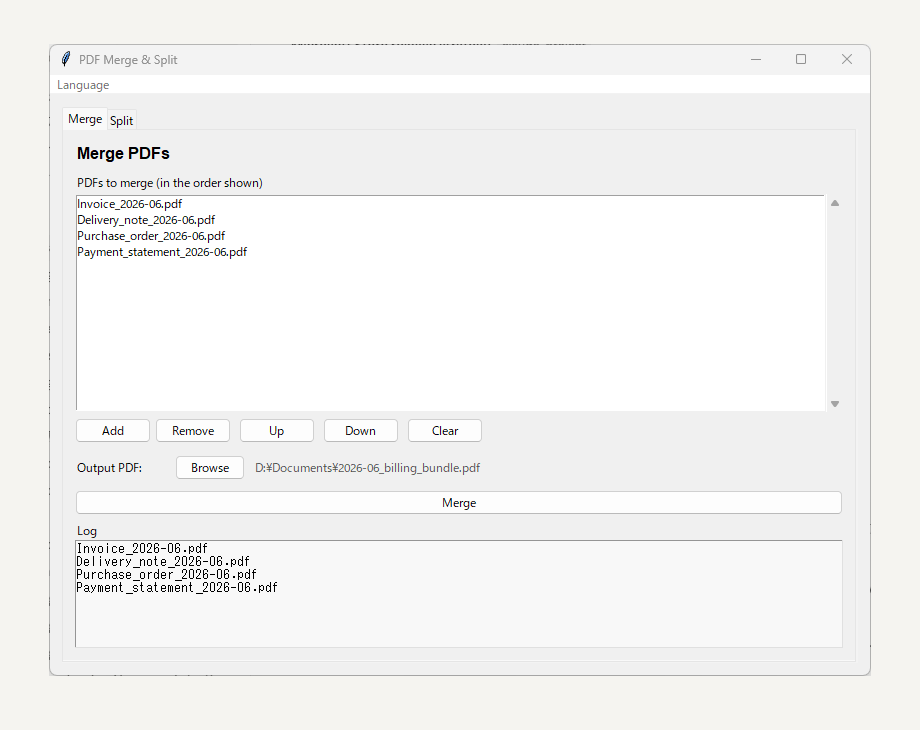
PDF Merge & Split Toolkit on Windows, merging four PDFs into one billing bundle

Why offline matters

Invoices, contracts, medical records, scans of your ID — the PDFs you merge are usually the ones you least want on a stranger's server.

🔒

Private by design

All processing happens on your PC. Nothing is uploaded, logged, or "temporarily stored". There is no server.

No upload wait

A 200 MB scanned PDF merges in seconds — you skip the upload and the download entirely.

✈️

Works anywhere

On a plane, on a locked-down office network, behind a firewall. No internet connection required.

Two jobs, done well

No 40-button ribbon. Merge and split — the two things you actually need most days.

Merge PDFs in the order you want

Add files, reorder them with a click, merge into a single document.

  • Combine scanned pages into one deliverable
  • Attach supporting documents to an invoice before sending
  • Stitch chapters or reports into a single file
Merge tab: reorder PDFs and combine them into one file

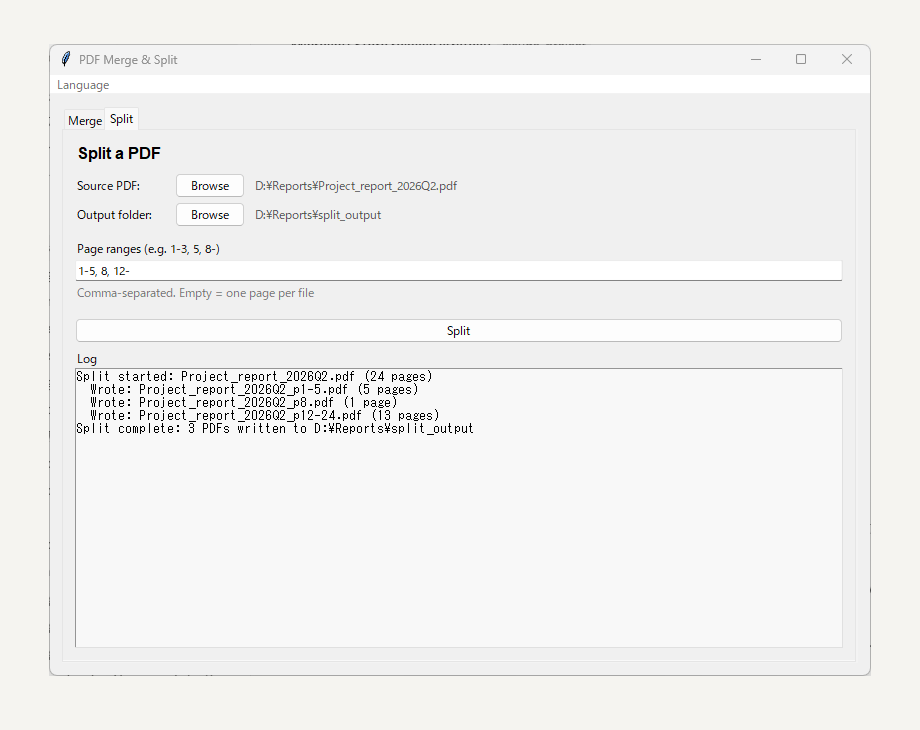
Split by page ranges

Type ranges like 1-3, 5, 8- and get separate files. Leave it empty to split every page into its own PDF.

  • Extract just the chapter you need
  • Break oversized PDFs to fit email attachment limits
  • Separate a batch scan back into individual documents
Split tab: extract page ranges into separate PDF files

Honest pricing

Cheaper than a coffee. Cheaper than one month of a PDF subscription — forever.

$0.99 one-time
  • All features included — no upsells inside
  • All future updates free
  • No account, no ads, no telemetry
  • Lightweight: ~12 MB, no background service
Get it from the Microsoft Store

FAQ

Do my PDF files get uploaded anywhere?

No. The app has no online features at all. Files are read and written only on your PC — you can even run it with the network unplugged.

Does it work with password-protected PDFs?

Encrypted PDFs are not supported yet. Remove the password first, then merge or split as usual.

What Windows versions are supported?

Windows 10 (build 17763 or later) and Windows 11, x64.

Is it really a one-time purchase?

Yes. $0.99 once via the Microsoft Store. All future updates are included — no subscription, no in-app purchases.

Can I use it in Japanese?

Yes — the app ships with English and Japanese, and picks your system language automatically.

Stop uploading your documents.

Merge and split PDFs on your own machine, for less than a dollar.